Overview
ServiceTitan Max brings all features— Marketing, Scheduling, Contact Center Pro, Dispatch, Pricebook, Field, and Fleet (optional)— together with Atlas into a single connected workflow. Contact Center Pro is the recommended telecom for ServiceTitan Max and integrates natively; existing customers may also continue with Basic Phones or Phones Pro. Rather than treating each feature as a stand-alone tool, ServiceTitan Max is designed to be experienced as one end-to-end revenue cycle, from the first customer touchpoint through invoice, review, and re-engagement.Rather than treating each workflow as a stand-alone tool, ServiceTitan Max is designed to be experienced as one end-to-end revenue cycle, from the first customer touchpoint through Invoice, review, and re-engagement.
This guide traces that full journey. It shows how a single customer interaction moves through every Max component — and which role on your team owns each step. Use it as a reference when you need to understand how the products connect, where handoffs happen, and how upstream decisions affect downstream outcomes.
The guide covers:
Pre-go-live admin setup that prepares your Max environment
The customer journey from demand capture through invoice
Reputation Management and re-engagement after the Job
Role-by-role responsibilities and handoffs at each stage
The Max Flywheel — how the cycle feeds itself
Benefits
One connected workflow. Marketing attribution, Contact Center routing, Scheduling capacity, Dispatch recommendations, Field intelligence, and Pricebook dynamic pricing all operate against the same Customer Record and the same business data.
Faster ramp-up for every role. When new hires understand the full journey, they make better decisions in their own seat — a CSR who knows how a booking flows into Dispatch books smarter, and a dispatcher who understands Field coaching data dispatches with the right technicians.
More revenue from existing demand. Capabilities like Abandoned Call Recovery, Second Chance Leads, Speed to Lead, Marketing automated campaigns, and Outbound Virtual Agents work together to capture, recover, and re-engage demand that would otherwise be lost.
Tighter coaching loops. Field conversation data combined with job and revenue data lets managers coach technicians with evidence, not anecdotes.
A self-reinforcing flywheel. Every completed job feeds reputation, reputation feeds new demand, new demand feeds the Dispatch Board — and so on.
Who uses this feature
Administrators and Office Managers
Managers and Owners
Customer Service Representatives (CSRs)
Dispatchers
Technicians
Marketing Managers
Accountants
Applies to all business types
Applies to all trades
Feature configuration
A ServiceTitan Max subscription is required. ServiceTitan Max includes all features — Marketing, Scheduling, Contact Center, Dispatch, Pricebook, Field, and Fleet (optional)— plus Atlas, the next-generation mobile experience and AI assistant.
Contact Center Pro is the recommended telecom tool for ServiceTitan Max and is what this guide's Phase 2 (Call Management & Inbound Booking) is written around. Existing customers moving to ServiceTitan Max may continue using Basic Phones or Phones Pro — both are permitted and the connected Max workflow still runs. Voice Agent and Second Chance Leads are available on all three telecom systems; Abandoned Call Recovery is available on Basic Phones, Phones Pro, and Contact Center Pro.
The ServiceTitan Field Mobile App is the mobile experience for technicians in ServiceTitan Max.
Initial Max environment setup must be completed before the cross-product workflow can run end to end. See Admin Setup Checklist for ServiceTitan Max.
An Enterprise Hub network is required for the recommended user creation workflow.
Things to know
ServiceTitan Max is best learned as a workflow, not as seven separate products. The same job moves through Contact Center, Scheduling, Dispatch, the ServiceTitan Field Mobile App, Pricebook, and Marketing — and what each role does in their step affects every step that follows.
Atlas appears in two places: as the next-generation mobile experience inside the ServiceTitan Field Mobile App, and as the AI integration inside Field for in-field equipment diagnostics.
Titan Intelligence is the AI brand powering Dispatch recommendations, Second Chance Leads, Outbound Virtual Agents, Voice Agents, and other intelligent features across the suite.
How to use this guide
This is a reference guide, not a linear training curriculum. Different roles will use it differently:
Administrators and Office Managers use Phase 0 as a setup map and the full journey as a configuration reference — where does each setting affect the customer experience?
Managers and Owners use the journey to coach team members on cross-product handoffs, and use Phase 9 (The Max Flywheel) as the operational model for ongoing management.
CSRs focus on Phase 2 but use Phases 1, 3, and 8 to understand where their inbound calls come from and where their unbooked calls go next.
Dispatchers focus on Phase 4 and use Phase 3 to understand what they're inheriting from Scheduling Pro.
Technicians focus on Phase 5 and use Phases 6 and 7 to understand what their job-closing actions trigger.
Marketing Managers own Phases 1, 7, and 8, and use Phase 9 (The Max Flywheel) to track how marketing data and outcomes feed every other phase.
Accountants focus on Phase 6 and use Phases 3, 4, and 5 to understand why the invoices that reach them are already priced correctly, why Payments post cleanly, and where membership revenue commitments originate.
For role-specific training paths through ServiceTitan Academy, see Add and train new users in ServiceTitan Max.
Get started
The end-to-end ServiceTitan Max workflow runs in phases that mirror the customer's experience with your business. Each phase has one or more responsible roles and depends on the configuration completed in the phase before it.
To start using ServiceTitan Max as a connected workflow:
Complete Phase 0: pre-go-live admin setup
Walk through Phase 1 through Phase 8: the customer journey
Use Phase 9 to operate the Max Flywheel — the cycle that turns completed work back into new demand
Phase 0: Pre-Go-Live Admin Setup
Owned by: Administrator or Office Manager • Manager or Owner
Before the connected workflow can run, the Max environment has to be configured and your team has to be ready to use it. This phase happens before any customer journey begins.
To prepare the Max environment:
Complete platform foundations. Configure company settings, business units,Job Types, and employee setup in ServiceTitan Core. These are the structural elements that every feature relies on — Dispatch zone mapping uses your business units, Scheduling capacity planning uses your job types, and Pricebook pricing rules apply at the Business Unit level.
Provision telecom and SMS. Walk through Telecom Basic provisioning, Enterprise Hub network setup, phone number porting, and initial routing configuration. Complete TCR (The Campaign Registry) registration to unlock SMS capabilities required for Marketing campaigns and customer notifications.
Configure your telecom system. Contact Center Pro is the recommended telecom for ServiceTitan Max and handles inbound and outbound calls, queue routing, and Call records natively in the Max workflow. If you are an existing customer continuing with Basic Phones or Phones Pro, complete their configuration instead — the connected Max workflow still runs, and Second Chance Leads, Voice Agent, and Abandoned Call Recovery remain available (setup workflows differ by telecom system; see the per-telecom setup articles referenced below).
Configure Ad Cap (ACP). Set ad spend limits so your marketing budget is protected and Dispatch performs correctly against demand it can actually serve.
Add users in Enterprise Hub and complete profiles in ServiceTitan. Create CSRs, dispatchers, technicians, and marketing users. Assign role-based permissions, set business units and dispatch Zones, and configure mobile access for technicians. For the full workflow, see Add and train new users in ServiceTitan Max.
Build the Pricebook. Add services, materials, and equipment; set base prices; and organize categories. This is the foundation Pricebook builds dynamic pricing on top of.
Configure Scheduling. Set availability windows, shift patterns, and job type and business unit mapping so the platform can recommend bookable time slots based on real capacity.
Configure Dispatch. Configure zones, skills, rules, and alert thresholds during onboarding.
Configure Marketing foundations. Set company information, branding, sender details, and unsubscribe settings so campaigns can launch cleanly when you're ready.
Tip: The Admin Setup Checklist in ServiceTitan Max walks through this phase in order. Treat it as a single sequence — skipping ahead can create gaps that surface as broken handoffs later in the journey.
Note: Once your Max environment is live, the journey below runs continuously. Each customer interaction passes through these phases in order, and many run in parallel as different customers move through different stages at the same time.
The customer journey through ServiceTitan Max
The next eight phases follow a single customer interaction from the first touch through re-engagement. The journey assumes your Max environment is live and configured per Phase 0.
Phase 1: Demand Capture & Online Booking
Owned by: Marketing Manager (setup, optimization) • Customer (self-service booking) • CSR (assist when needed)
Demand for service starts before any phone rings. Marketing campaigns, Google Ads, your Google Business Profile, and your website all generate customer interest — and ServiceTitan Max is built to capture that interest, attribute it correctly, and convert it into bookable jobs.
The pieces that operate in this phase:
Marketing campaigns. Automated email and Direct Mail Campaigns target the right audience — for example, an Unsold Estimates campaign that re-engages customers who received an Estimate but didn't book. Subsequent targeted campaigns segment further (by service type, lifecycle stage, or Membership status).
Google Booking. Connect your Google Business Profile so customers can book directly from Google Search and Google Maps without leaving Google. The booking flows into ServiceTitan as a real job, not a lead form.
Scheduling online scheduler. Embed the online scheduler on your website so customers can self-book 24/7. Scheduling reads live capacity and only offers time slots your team can actually deliver.
Ads Optimizer and DNI. Ads Optimizer analyzes Google Ads performance and surfaces recommendations. Dynamic Number Insertion (DNI) attributes inbound calls to the campaign that drove them, so attribution is accurate end to end.
Ad Cap (ACP). Caps ad spend at the limits you set, so you don't outpace the capacity your team can serve.
Handoff: When a customer self-books online, the job lands directly on the Scheduling–managed schedule, ready for Dispatch. When a customer calls instead of booking online, the call routes into your telecom system (Contact Center Pro recommended; Basic Phones or Phones Pro permitted) and the journey continues at Phase 2.
Phase 2: Call Management & Inbound Booking
Owned by: CSR (live calls, callbacks, Second Chance Leads) • Administrator or Office Manager (feature configuration)
When a customer calls your business, your telecom system routes the call and captures the interaction. Contact Center Pro is the recommended telecom for ServiceTitan Max and is what the workflow below is written around. Existing customers who continue with Basic Phones or Phones Pro can still operate the Max Call Management workflow — the connected suite still runs, and the core capture capabilities (Second Chance Leads, Abandoned Call Recovery, Voice Agent) are available across all three telecom systems, though setup workflows differ by system.
Where the call lands
With Contact Center Pro (recommended): Live calls and callbacks land in the CSR's queue within Contact Center Pro. Caller history surfaces automatically, so the CSR sees prior visits and outstanding estimates before answering. Contact Center Pro provides native queue routing and is the natively integrated telecom for the Max workflow.
With Basic Phones or Phones Pro: Calls route into your telecom's queue and screen. CSRs can still access caller history within ServiceTitan and book jobs against live capacity. Call recovery and AI-assisted call handling remain available (see below); configuration follows the telecom-specific setup articles.
The pieces that operate in this phase:
Contact Center inbound experience. Live calls land in the CSR's queue alongside callbacks and Second Chance Leads. Caller history surfaces automatically, so the CSR sees prior visits and outstanding estimates before answering.
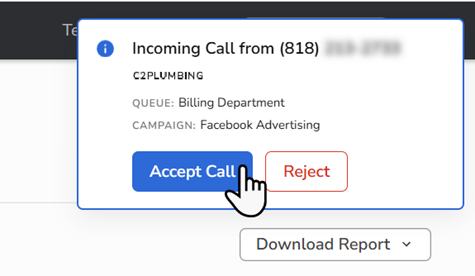
Capacity-aware scheduling. When the CSR books a job during the call, Scheduling reads live capacity and offers only the time slots the team can deliver. This replaces the standard ServiceTitan booking flow, where the CSR has to manually reason about who's available.
Membership offers at booking. Membership pricing surfaces during the booking workflow, so the CSR can offer and process a membership offer at the right moment in the call.
Second Chance Leads. Titan Intelligence identifies missed-call recovery opportunities from unbooked, excused, or "not a lead" calls and surfaces them to the CSR as bookable leads. CSRs configure their notification preferences (in-app, text, email) under Call Booking > Preferences > Second Chance Leads. For ServiceTitan Max customers, Second Chance Leads is included in the Max subscription regardless of telecom choice.
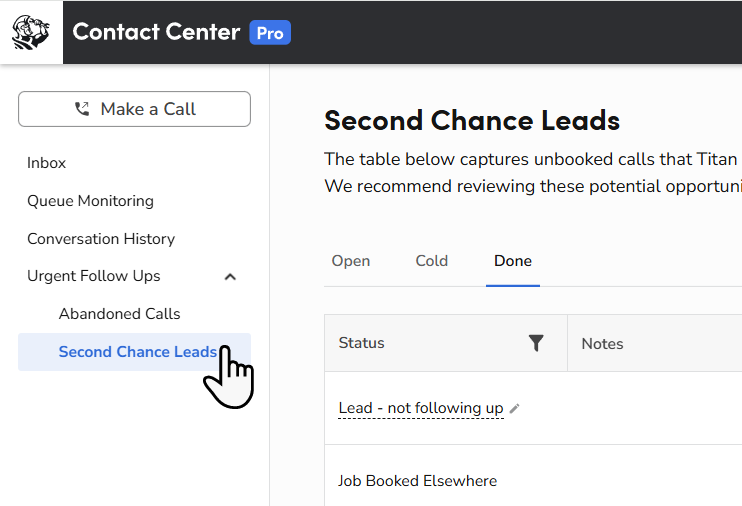
Abandoned Call Recovery. When a call is missed or abandoned, the platform creates a follow-up record so the CSR can call back. No missed call is lost. Setup and behavior differ between Contact Center Pro and Basic Phones/Phones Pro — see the corresponding setup articles.
Voice Agent. AI-powered call handling that can take routine call handling off CSR queues over time. Voice Agent works across all three telecom systems. Voice Agent allotments are included in Max for new-logo customers (usage above the allotment is pay-per-use); existing customers upgrading to Max do not receive VA allotments as part of the Max subscription (see Feature configuration). Voice Agent is typically configured in the Optimization phase post go-live.
Speed to Lead. When inbound leads arrive from third-party aggregators, Speed to Lead routes them to a CSR for immediate outreach — the goal is responding before competitors do.
Converting unbooked calls into leads. When a call ends without a booking, the CSR converts the call record into a trackable lead. This is the bridge between live call handling and the Marketing re-engagement campaigns that run later in the journey.
CSR queue priorities. A CSR working in ServiceTitan Max manages three concurrent workstreams — live inbound calls, callbacks, and Second Chance Leads. Each has a different urgency and a different conversion pattern. Live calls and callbacks are handled through your telecom system's queue; Second Chance Leads are surfaced via ServiceTitan notifications (in-app, text, or email) that the CSR configures under Call Booking > Preferences.
Handoff: Once the CSR books a job, the Appointment lands on the Scheduling–managed schedule and surfaces on the Dispatch board. The CSR's job on that interaction is done. The dispatcher takes over.
Note: Voice Agents — AI-powered call handling — are configured in the Optimization phase post go-live and can take routine call handling off CSR queues over time.
Phase 3: Smart Scheduling & Capacity Planning
Owned by: Administrator or Office Manager (Capacity Rules) • Manager or Owner (weekly capacity review) • Dispatcher (day-of adjustments)
Scheduling is the layer that turns "we have an opening Thursday" into "we have an opening Thursday between 10 and 12 for an HVAC diagnostic in the East zone." It manages the rules and capacity that both online booking (Phase 1) and CSR booking (Phase 2) operate against.
The pieces that operate in this phase:
Availability windows and shift patterns. Configure when the team is bookable and how many concurrent appointments each window can hold.
Job type and business unit mapping. Map job types to the business units that perform them, so Scheduling only offers slots your team can actually staff.
Capacity-aware booking. Both online and CSR-booked jobs read live capacity at the moment of booking. This protects the schedule from over-commitment.
Weekly schedule management. The Office Manager reviews the booking queue, monitors capacity utilization, and handles exceptions — for example, opening additional capacity when demand spikes.
Handoff: Scheduling hands every booked job to Dispatch for technician assignment. From the dispatcher's perspective, every appointment that arrives on the board has already been validated against capacity.
Phase 4: Smart Dispatching with Dispatch
Owned by: Dispatcher (live board) • Administrator or Office Manager (Dispatch Pro configuration) • Manager or Owner (optimization)
Dispatch is the AI-powered layer on top of the dispatch board. It reads job data, technician data, fleet data, and historical performance, then recommends which technician should take which job. The dispatcher remains in control — Dispatch recommends, the dispatcher decides.
The pieces that operate in this phase:
Configuration foundation. Zones, skills, rules, and alert thresholds configured during onboarding shape what Dispatch recommends. These are revisited in the Optimization phase post go-live.
Day-of dispatching with Dispatch active. The dispatcher starts the day by reviewing the board with Dispatch recommendations live. The morning routine is to read recommended assignments, validate them against the day's reality, and approve or adjust.
Real-time board management. When the day shifts — cancellations, urgent calls, technicians running late — Dispatch recommendations update dynamically. The dispatcher reacts to the new state of the board, not to a frozen morning plan.
Fleet telematics in dispatch (optional). Fleet telematics data surfaces inside Dispatch to improve routing, reduce drive time, and inform technician assignment. The dispatcher sees real-time GPS context as they make decisions.
Technician communication. The dispatcher communicates with technicians in the field through ServiceTitan during the day — schedule changes, urgent reassignments, customer updates.
Manual to automated mode. In the Optimization phase, customers can transition Dispatch from manual recommendations to automated dispatch mode as their team and ServiceTitan data mature.
Handoff: Once a job is dispatched, the technician receives the assignment on the ServiceTitan Field Mobile App. The dispatcher remains the air-traffic controller for the day, but the work moves to the field.
Phase 5: Field Execution
Owned by: Technician (field workflow) • Manager or Owner (Field coaching post-job) • Customer (in-home experience)
Field execution is where the customer experiences your business directly. Every Max capability in this phase exists to make the technician faster, more informed, and more effective at the point of work.
The pieces that operate in this phase:
The ServiceTitan Field Mobile App. The mobile experience for technicians in ServiceTitan Max. Atlas-powered screens — the next-generation mobile experience — appear throughout the day-of workflow.
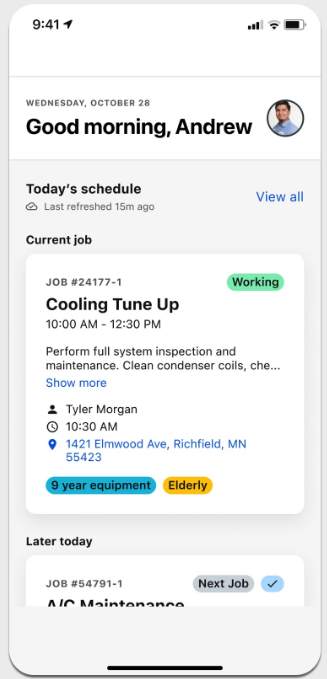
Morning workflow. The technician reviews the day's schedule, uses mobile routing to plan the day, and surfaces what's coming. Atlas-powered screens make this faster than the legacy ServiceTitan Mobile experience.
Arrival and check-in. When the technician arrives at the job, Atlas-powered screens surface customer history and prior visit notes. The technician checks in and starts the job record.
Service visit execution. The technician runs diagnostics, captures photos and video, and builds a recommendation list while Field records the conversation. Atlas-powered AI inside Field assists with in-field equipment diagnostics.
Field conversation recording. Field (powered by Siro) records the customer conversation. The recording is used later for coaching and dispute resolution.
Good-Better-Best estimates with Pricebook. The technician presents tiered options to the customer face-to-face using the Pricebook–powered estimate builder. Dynamic pricing surfaces the right price point at the point of sale — not a static catalog price set months ago at the office.
Closing out the job. Payment collection and customer signature happen in the ServiceTitan Field Mobile App. Closing the job in the field is the action that triggers downstream Max workflows.
Handoff (and trigger): When the technician closes the job, three downstream Max workflows fire automatically: the invoice flows to billing (Phase 6), the reputation request goes out (Phase 7), and the customer enters the eligible audience for re-engagement campaigns (Phase 8). One field action sets the rest of the journey in motion.
Tip: Closing the job in the field — not back at the office — is what activates the rest of the Max cycle. Coach technicians to complete the job record before they leave the driveway.
Phase 6: Billing & Invoicing
Owned by: Accountant (billing and invoicing lead) • Administrator or Office Manager (invoice exceptions) • Manager or Owner (revenue cycle oversight) • Technician (initial collection in the field, when applicable)
Once a job is closed, the invoice and payment record flow into ServiceTitan's billing workflow. In ServiceTitan Max, this isn't a separate operation — it's a continuation of the field execution that just happened.
What Max does for the accountant:
Invoices arrive priced correctly. Pricebook's dynamic pricing runs at the point of sale in Phase 5, so the invoice the accountant sees already reflects the price the customer agreed to — no reconstructing amounts after the fact, no back-office pricing adjustments to reconcile.
Payments post against real work. Payments collected in the field (Phase 5) post automatically against the invoice with a full record of what was sold, who sold it, and the customer conversation that led to the sale (via Field recording). Cash application is faster and the Audit Trail is complete.
Fewer exceptions to chase. When capacity-aware scheduling (Phase 3), Dispatch assignment (Phase 4), and Pricebook pricing all agree on the same job data, the invoice that lands in accounting is internally consistent. Discrepancies that used to require back-and-forth between the office, the field, and the ledger are largely eliminated before they get to the accountant's queue.
Membership revenue is trackable. Memberships and service agreements sold at booking (Phase 2) or in the field (Phase 5) are recorded as recurring revenue commitments; the accountant sees them here for renewal handling, revenue recognition timing, and reconciliation.
A cleaner month-end. Because pricing, dispatching, and field data are consistent by the time the invoice is issued, the accountant spends less time reconciling exceptions and more time on close activities that actually need judgment.
The pieces that operate this phase:
Job completion to invoice. Closed jobs flow into billing records automatically. Dynamic pricing data from Pricebook and job data captured through Field are already on the invoice.
Processing and managing invoices. The accountant, with support from the Office Manager, processes completed jobs, manages exceptions, and sends invoices.
Payments and adjustments. Payments collected in the field (Phase 5) post against the invoice. Office adjustments — discounts, reissues, write-offs — happen in the standard ServiceTitan accounting workflow.
Membership management. Memberships and service agreements created during booking (Phase 2) or in the field (Phase 5) are managed here for renewal, exceptions, and tracking. Memberships also interact with Marketing campaign triggers in Phase 8.
Note: In ServiceTitan Max, the invoice already reflects Pricebook dynamic pricing and Field job data. The accountant isn't reconstructing the price after the fact — they're processing what was already priced correctly at the point of sale.
Handoff: Payment records post to the general ledger through the standard ServiceTitan accounting workflow. Membership renewal data flows to Marketing (Phase 8) for automated renewal campaigns.
Phase 7: Reputation & Reviews
Owned by: Marketing Manager (reputation configuration and oversight) • Customer (review action)
A closed job is also the moment of highest customer satisfaction, which makes it the best moment to ask for a review. ServiceTitan Max automates the ask and routes responses.
The pieces that operate in this phase:
Automated review request surveys. Configure automated surveys so Review Requests go out automatically after job completion.
Google and Facebook integration. Connect Google and Facebook so reviews land where prospective customers actually look.
Technician matching and star ratings. Reputation Management's technician matching logic pulls the technicians assigned to each job and matches them to incoming public reviews. Auto Verification (optional, ML-based) can automatically verify and match reviews to the most relevant job and tech. Technicians accumulate an average star rating from job completion surveys, which becomes their technician star rating once they have five or more completed surveys — visible on the Technician Scorecards dashboard. Use these ratings to identify top performers and coaching opportunities. Positive reviews become a recognition and coaching tool, not just a marketing asset.
Listings management. Manage your business listings across connected review platforms from a single Reputation Management surface.
Handoff: Positive reviews feed back into Phase 1 — they improve your search visibility, your Google Business Profile, and the conversion rate of every campaign that runs after. This is the first place the flywheel starts to show itself.
Phase 8: Re-engagement
Owned by: Marketing Manager (campaign strategy and execution) • CSR (handling responses)
Not every job closes with a sale, and not every customer comes back on their own. Marketing runs the re-engagement that keeps customers in the cycle.
The pieces that operate in this phase:
Unsold Estimates campaign. An automated campaign that targets customers who received an estimate but didn't book. This is typically the first Marketing campaign customers launch in Max.
Subsequent targeted campaigns. Additional automated campaigns segment further — by service type, lifecycle stage, membership status, or geography. Building a second campaign reinforces the workflow.
Audience health and segmentation. The customer database in Marketing maintains segments. Audience health and segmentation underpin every smart campaign decision.
Membership-triggered campaigns. Memberships and service agreements (from Phase 6) trigger renewal and maintenance campaigns automatically. This is where the membership program and the marketing program reinforce each other.
Campaign 3 and beyond. In the Optimization phase, advanced audience segmentation, lifecycle triggers, and performance data from earlier campaigns shape more sophisticated campaign strategy.
Handoff: Customers who respond to re-engagement campaigns re-enter the journey at Phase 2 — they call your business or book through the online scheduler. The cycle starts again, with everything ServiceTitan now knows about them informing the next interaction.
Phase 9: The Max Flywheel
Owned by: Manager or Owner (oversight) • All roles (operation)
The phases above describe one journey through ServiceTitan Max. The Max Flywheel describes what happens when that journey runs continuously, over weeks and months, and the data each phase generates feeds the phases that come after.
The Flywheel turns because:
Marketing campaign data improves audience segmentation, which improves campaign performance, which improves the quality and volume of inbound demand.
Contact Center call data — including Abandoned Call Recovery and Second Chance Leads outcomes — informs Speed to Lead and Voice Agent configuration, which improves capture rates.
Scheduling capacity data informs Ad Cap (ACP) settings, which protects the marketing budget by aligning ad spend with actual capacity.
Dispatch performance data informs alert thresholds, scoring weights, and the eventual transition from manual to automated dispatch mode.
Field conversation data combined with job and revenue data fuels coaching, which improves estimate conversion rate and average ticket.
Pricebook dynamic pricing data informs pricing strategy adjustments and margin outcomes after go-live.
Reputation Management turns every completed job into a marketing asset that improves the conversion rate of every future campaign.
Re-engagement campaigns turn unsold estimates and lapsed customers back into bookable demand.
What the manager or owner watches in this phase:
Daily check-in metrics. A handful of numbers reviewed every morning — jobs on the board, technician utilization, inbound call volume, same-day booking rate — that signal how today is going.
Weekly reporting routine. Key reports pulled every week to drive operational decisions, not just to tour the reports module.
Cross-product performance dashboard. A weekly management view showing where each feature is contributing to the revenue cycle.
Field coaching cadence. Recordings reviewed, coaching moments identified, and the connection between conversation patterns and revenue outcomes acted on.
90-day Max checkpoint. Use ServiceTitan data to evaluate Max ROI at the 90-day mark, identify adoption gaps, and plan the next round of optimization.
Tip: The Flywheel doesn't start working at full speed on day one. The first 30 days are about running the cycle cleanly. The next 60 are about tightening it. By the 90-day checkpoint, every feature should be feeding data into the next.
Role responsibilities across the journey
Every Max workflow is multi-role. Use the matrix below as a quick reference for who owns what at each phase.
Phase | Administrator or Office Manager | Manager or Owner | CSR | Dispatcher | Technician | Marketing Manager |
|---|---|---|---|---|---|---|
1 — Demand Capture & Online Booking | Support | Oversight | Support | — | — | Lead |
2 — Call Management & Inbound Booking | Configuration | Oversight | Lead | — | — | — |
3 — Smart Scheduling & Capacity Planning | Lead | Weekly review | — | Day-of adjustments | — | — |
4 — Smart Dispatching | Configuration | Optimization | — | Lead | Receives assignments | — |
5 — Field Execution | — | Coaching | — | — | Lead | — |
6 — Billing & Invoicing | Lead | Revenue oversight | — | — | In-field collection | — |
7 — Reputation & Reviews | — | Oversight | — | — | Indirect (earns reviews) | Lead |
8 — Re-engagement | — | Oversight | Handles responses | — | — | Lead |
9 — The Max Flywheel | Daily operations | Lead | Operation | Operation | Operation | Operation |
Want to learn more?
See ServiceTitan Max post Go-Live checklist: After your first 30 days
See Set up capacity and availability with Scheduling in ServiceTitan Max
See Day-of-dispatching: A Dispatcher's Guide in ServiceTitan Max
See Reputation management setup and best practices in ServiceTitan Max
See Review Field performance and recordings in ServiceTitan Max
Visit ServiceTitan Academy and enroll in the role-based ServiceTitan Max learning plan for your team